Best Video Conferencing Software in 2026: 9 Tools Compared
Compare the best video conferencing software for teams and small business. We review nine tools on price, meeting limits, guest joining, and free plans.
- Editor's choice
 Zoom Workplace
Meeting-first teams and client calls
Starts at$15.99 per user per monthVisit zoom.usFull review - Great alternative
 Microsoft Teams
Microsoft 365 teams
Starts at$4.00 per user per monthVisit microsoft.comFull review - Also consider
 Google Meet
Google Workspace teams
Starts at$7.00 per user per monthVisit meet.google.comFull review
TL;DR:
- Zoom remains the most meeting-focused choice for teams that run calls with clients outside their own company.
- Microsoft Teams and Google Meet often win on value, since many teams already pay for Microsoft 365 or Google Workspace.
- Webex suits larger or regulated teams that need strong admin controls and compliance features.
- Jitsi Meet is the best free option for simple calls, with no account needed for guests in many setups.
- Free plans all cap group meeting length or size, so check those limits before you rely on a free tier for work.
Quick comparison
| Tool | Best for | Starts at | Free plan? | |
|---|---|---|---|---|
| Zoom Workplace | Meeting-first teams and client calls | $15.99 per user per month | Yes | Visit |
| Microsoft Teams | Microsoft 365 teams | $4.00 per user per month | Yes | Visit |
| Google Meet | Google Workspace teams | $7.00 per user per month | Yes | Visit |
 Webex | Enterprise security and controls | $14.50 per user per month | Yes | Visit |
 GoTo Meeting | Simple and reliable meetings | $12.00 per organizer per month | No | Visit |
 Zoho Meeting | Budget small business meetings | $3.00 per host per month | Yes | Visit |
 Jitsi Meet | Free open source meetings | Free | Yes | Visit |
 RingCentral | Voice, video, and messaging in one place | $20.00 per user per month | No | Visit |
 Slack Huddles | Quick team huddles inside Slack | $7.25 per user per month | No | Visit |
The best video conferencing software
We compared official feature pages, pricing, app store listings, privacy policies, and public reviews to judge meeting quality, limits, integrations, and value. Prices shown are entry paid prices from vendor pages and recent comparisons, and they can change with billing period and plan.
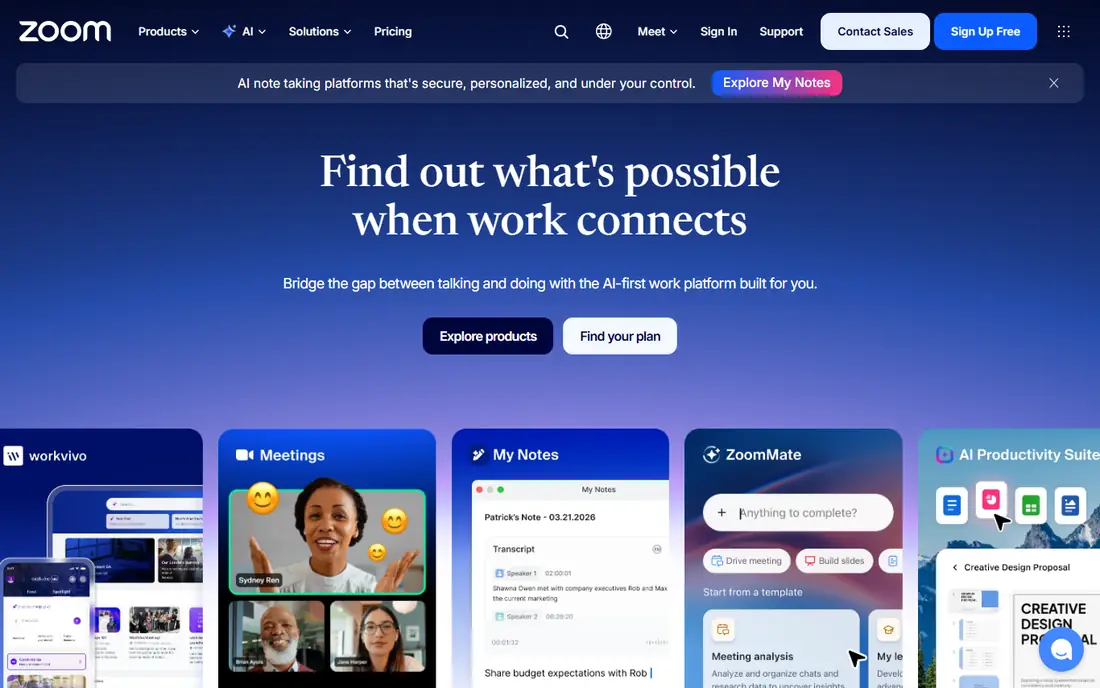
Zoom fits a team that runs most of its work through video calls, especially with clients who use different systems. Guests can join from a link with little setup, and hosts get breakout rooms, polls, whiteboard, and recording on paid plans. The AI Companion summary features on paid plans also help teams that run many meetings each week.
The free plan caps group meetings at 40 minutes for up to 100 people, which is too short for many work calls. Paid plans start at $15.99 per user per month on monthly billing in recent vendor comparisons, with lower annual rates in some listings. Check the current pricing page for your billing choice before you budget.
- Familiar joining experience
- Breakout rooms and whiteboard
- Webinar and room options
- Paid features can feel like more than a small team needs
- Price rises with add-ons

Teams suits a company that already lives in Outlook, SharePoint, and OneDrive. Meetings, chat, channels, and files sit together, so a call can turn into a shared document without switching apps. The standalone Teams Essentials plan starts at $4.00 per user per month, and business plans add larger meetings and more storage.
For a team that does not use Microsoft 365, Teams can feel like a large system for a simple call. The free version caps group meetings at 60 minutes for up to 100 people, which is useful for short calls but not for a full workday of meetings. Choose Teams when the suite around it is already part of your workflow.
- Deep Microsoft 365 integration
- Chat, files, and meetings in one place
- Large meeting capacity on business plans
- Setup can feel heavy for a small team
- Best value only if you already use Microsoft 365

Google Meet fits a team that schedules in Google Calendar and wants guests to join from a browser with no download. The interface is plain, screen sharing and captions are easy to find, and paid Workspace plans raise meeting size and add recording and noise cancellation. For a Google-first team, that simplicity is a real strength.
The free plan caps group calls at 60 minutes for up to 100 people, and one-to-one calls have a longer allowance. Meet is less focused on large public webinars than Zoom or dedicated webinar tools, so a team that runs big events may need an add-on or a second tool. For internal and client meetings, it is hard to beat for ease.
- Browser-first joining
- Strong Google Calendar integration
- Simple guest experience
- Fewer webinar features than Zoom
- Full value needs a Workspace plan
Webex suits a larger company, a regulated team, or a Cisco hardware shop that needs tight admin control. It offers encryption, compliance features, and detailed admin settings, plus meeting, webinar, and contact center options in the wider suite. The free plan covers up to 100 people with a 40-minute group limit, which is useful for testing.
Price is the main drawback for a small team, since paid plans start around $14.50 per user per month in recent comparisons. A small business that only needs simple calls will find better value in Teams, Meet, or Zoho Meeting. Choose Webex when security, control, and scale matter more than the lowest price.
- Strong security and compliance options
- Admin controls
- Large meeting and webinar options
- Higher entry price than bundled rivals
- Interface can feel formal for casual teams
GoTo Meeting fits a small team that wants a dependable meeting tool without a large suite around it. Hosts can start a meeting quickly, share a screen, and use drawing tools, and guests join from a link. Paid plans start at $12.00 per organizer per month in recent comparisons, which keeps costs clear for a small host team.
The lack of a free plan makes it harder to test with a full team, and it does not match Zoom or Teams on chat, whiteboard depth, or app integrations. If your team only needs solid meetings and values a simple setup, GoTo Meeting is a calm, practical choice.
- Straightforward setup
- Reliable audio and video
- Screen sharing and drawing tools
- No free plan
- Fewer modern collaboration extras than larger suites
Zoho Meeting suits a small business that already uses Zoho apps or wants the lowest paid entry point on this list. Meetings run in a browser, hosts can share screens and record on paid plans, and webinar features are available for events. The free plan covers group meetings up to 60 minutes for up to 100 people in recent listings.
The trade-off is ecosystem size. Integrations and third-party apps are fewer than those for Zoom, Teams, or Google Meet, and some useful features sit on higher plans. For a budget team that mainly needs reliable internal and client calls, Zoho Meeting offers strong value for the price.
- Low entry price
- Browser-based meetings
- Webinar options on higher plans
- Smaller integration library than Zoom or Teams
- Some features need higher plans
Jitsi Meet fits a team, school, or community group that needs free video calls without a subscription. You can start a meeting in a browser, share a link, and invite guests with little setup. For a team with privacy or control needs, self-hosting Jitsi gives more say over where meeting data runs.
The limits are support and polish. There is no large vendor support team behind a free public instance, and features such as advanced admin controls, webinars, and AI summaries are not the focus. For simple, reliable calls, Jitsi Meet is an excellent free tool, but a business that needs guaranteed support should look at a paid plan elsewhere.
- Free to use
- No account needed for many guest joins
- Self-hosting option for control
- Fewer admin and support features
- Performance depends on hosting and connection
RingCentral suits a company that wants phone calls, video meetings, and team messaging under one subscription. Staff can move from a phone call to a video meeting without changing apps, and admins get call routing, analytics, and controls. That unified setup helps sales and support teams that live on the phone as well as on video.
For a team that only needs video, RingCentral costs more than a meeting-only tool, with entry plans around $20.00 per user per month in recent comparisons. There is also more setup than a simple meeting app. Choose RingCentral when voice is a core part of your work, not just an extra feature.
- Phone, video, and team messaging in one platform
- Strong call handling
- Admin controls
- Higher entry price
- More system than a team that only needs video calls
Slack Huddles fit a team that already works in Slack and wants fast, informal calls without scheduling a formal meeting. A huddle can start in a channel or direct message, people can share screens, and the conversation stays close to the work thread. That low friction is ideal for quick questions, pair work, and daily check-ins.
Huddles are not a replacement for a full conferencing platform. Large scheduled meetings, webinars, breakout rooms, and external client calls are better served by Zoom, Teams, or Meet. Use Huddles for speed inside Slack, and keep a dedicated meeting tool for formal and external calls.
- Instant audio and video inside Slack channels
- Screen sharing
- Low friction for existing Slack teams
- Not a full meeting platform
- Needs a paid Slack plan for video huddles with more features
How we picked these
We compared official feature pages, pricing, app store listings, privacy policies, and public reviews, and we favored tools that work in October 2026 for real teams, not just demos. We weighed meeting limits, guest experience, integrations, security controls, and price at the entry paid tier. We left out tools that had shut down or that only offered video as a minor add-on to an unrelated product.
What to check before you choose a video conferencing tool
Count how many people host meetings, not just how many people attend, since most tools charge per host or per user. Test a call with an outside guest, a screen share, and a weak connection, because those three cases expose most problems. Also check recording, captions, and storage rules, since those features often sit on higher plans.
Small business versus large team needs
A small business should favor low cost, simple joining, and a free plan for guests. A larger team should favor admin controls, security settings, single sign-on, and support response times. If your team already pays for Microsoft 365 or Google Workspace, start with Teams or Meet and only pay for a separate tool if a clear gap remains.
FAQ
What is the best video conferencing app for small business?
Zoom is a strong general pick for client calls, while Zoho Meeting offers the lowest paid entry point on this list. If your team already uses Microsoft 365 or Google Workspace, Teams or Meet will usually offer better value. Test the free plan with real guests before you pay.
What is the best free video conferencing software?
Jitsi Meet is the best free option for simple calls, with no account needed for many guest joins. Google Meet and Zoom also offer free plans, but group meetings are capped at 60 minutes and 40 minutes in turn. For regular work meetings longer than those limits, a paid plan is usually needed.
What is the best platform for virtual meetings with clients?
Zoom is often the safest choice for client calls, since most clients already know how to join. Google Meet is a close second for browser-based joining, and Teams works well when the client also uses Microsoft 365. Send a test link before an important call to avoid joining problems.
What is the best online meeting software for webinars?
Zoom, Webex, and GoTo Meeting all offer webinar options, but webinar capacity and features are often sold as add-ons. Check attendee limits, registration, polls, and recording before you buy, since entry meeting plans may not include full webinar features. For small webinars, Zoho Meeting can also be a budget option.
How many people can join a video conference for free?
Most free plans allow up to 100 people, with Zoom at 40 minutes for group calls and Google Meet and Teams at 60 minutes for group calls. Jitsi Meet does not set the same account-based cap on its public service, but performance depends on connection and hosting. Always confirm the current limit on the vendor page before a large free call.