Best Tool That Can Format Documents in 2026: 10 Tools Compared
Need the best tool that can format documents? We compared 10 options, from Word and Google Docs to Overleaf, Pandoc and Zotero, by price, free plan and best use.
- Editor's choice
 Microsoft Word
Documents that must look right for everyone
Starts atFreeVisit microsoft.comFull review - Great alternative
 Google Docs
Free, shared documents in a browser
Starts atFreeVisit workspace.google.comFull review - Also consider
 LibreOffice Writer
A free desktop word processor
Starts atFreeVisit libreoffice.orgFull review
TL;DR:
- Microsoft Word is still the safest choice for documents other people will open, and Word for the web is free; the desktop app needs Microsoft 365, which starts at $99.99 per year for Personal.
- Google Docs and LibreOffice Writer are the strongest free options, and both open and edit Word files.
- For academic papers, Overleaf (LaTeX) and Zotero handle the formatting most people struggle with: equations, references and citation styles, with Zotero supporting over 9,000 styles.
- Pandoc is free, open-source software that converts between Word, Markdown, HTML, EPUB and more, which makes it the best tool for reformatting documents in bulk.
- Long manuscripts are easier in Scrivener, which compiles one draft into Word, PDF, ePub and Kindle formats, and offers a 30-day free trial.
Quick comparison
| Tool | Best for | Starts at | Free plan? | |
|---|---|---|---|---|
| Microsoft Word | Documents that must look right for everyone | Free | Yes | Visit |
| Google Docs | Free, shared documents in a browser | Free | Yes | Visit |
| LibreOffice Writer | A free desktop word processor | Free | Yes | Visit |
 Apple Pages | Good-looking layouts on Mac, iPad and iPhone | Free | Yes | Visit |
 Canva Docs | Visual documents with banners and graphics | Free | Yes | Visit |
 Overleaf | Academic papers and math-heavy documents | Free | Yes | Visit |
 Zotero | Citations and bibliographies in any style | Free | Yes | Visit |
 Pandoc | Converting documents between formats | Free | Yes | Visit |
 Typora | Clean Markdown writing with polished export | $14.99 | Free trial (15 days) | Visit |
 Scrivener | Long manuscripts and books | See website | Free trial (30 days) | Visit |
The best tools that can format documents
"Formatting" covers a lot of jobs: making a report look professional, getting a thesis into APA style, turning a Markdown file into a Word document, or preparing a book for print. We grouped tools that handle different jobs so you can pick one main editor and add a specialist if you need it.
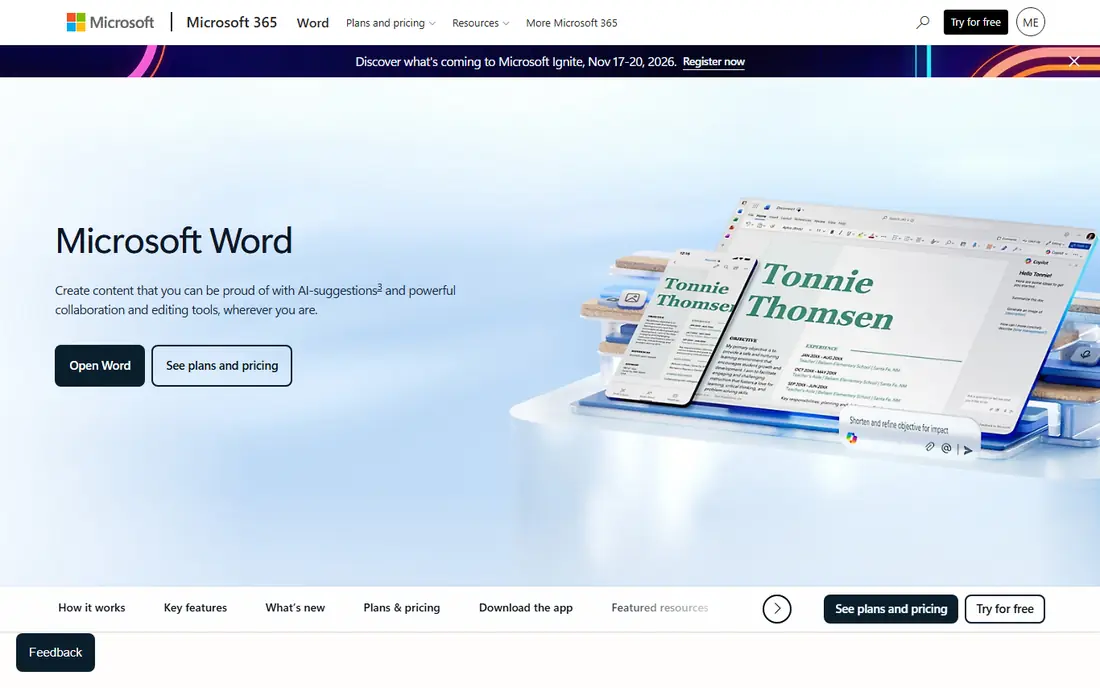
Word remains the format that schools, courts, publishers and most offices expect. If your document will be opened, edited or printed by someone else, starting in Word avoids most of the surprises that come with converting files later.
Microsoft offers a free version: Word for the web includes sharing and real-time collaboration, basic spelling and grammar, basic templates and 5 GB of cloud storage. The Windows and Mac desktop apps, which add the full set of styles, section breaks and layout tools, require Microsoft 365. Personal costs $99.99 per year, Family $129.99 and Premium $199.99, and Copilot in Word is available on these plans.
The honest catch is that Word's power hides behind menus. Learn to use Styles (Heading 1, Heading 2, Normal) instead of formatting text by hand, and long documents become far easier to fix.
- Free Word for the web with templates and collaboration
- Desktop apps have the deepest formatting controls
- Copilot can draft and edit inside documents on paid plans
- Desktop apps require a Microsoft 365 subscription
- Advanced formatting on mobile needs a subscription

Google Docs is the easiest way to format and share a document for free. Anyone with a Google Account can use it, and Google says you can edit Word documents directly without making a copy. Templates and building blocks give you a professional starting point, and pageless mode lets you write without page breaks.
Gemini adds AI help inside Docs on supported plans. Google says it can build formatted drafts from prompts and match the format and writing style of your existing documents.
The weakness is fine control. Complicated layouts, such as multi-column newsletters or strict legal formatting, are harder than in Word, and some formatting can shift when you export back to .docx.
- Free with any Google Account
- Opens and edits Word files directly
- Templates and pageless mode
- Fewer layout controls than Word
- Complex Word formatting can shift on import
LibreOffice Writer is the best free alternative for people who want a full desktop word processor without a subscription. The LibreOffice project says its tools come at no cost to you, and Writer is described as a word processor for everything from quick notes to full-length books.
It includes the features serious formatting needs: paragraph and page styles, automatic tables of contents, and export to PDF. It also opens and saves .docx files, so you can exchange documents with Word users.
The trade-off is polish. The interface looks dated next to Word or Pages, and files with heavy Word-specific formatting may need a little cleanup.
- Free with no account required
- Works offline on Windows, Mac and Linux
- Opens and saves Word documents
- Interface feels older
- Some complex Word files do not convert perfectly
Pages is the most pleasant way to make a document look designed if you use a Mac, iPad or iPhone. Its App Store listing confirms that creating, viewing and editing documents does not require a subscription, and it exports to EPUB, Microsoft Word, RTF, TXT and PDF.
It is especially good for flyers, reports and newsletters where you want images, text boxes and clean typography. Pages for iCloud also lets you edit in a web browser.
The catch is the Apple-first design. Windows users get only the iCloud web version, and Apple now offers premium templates and intelligence features through its Apple Creator Studio subscription, listed in the App Store at $12.99 per month or $129 per year.
- Free on Apple devices with no subscription needed to create and edit
- Exports to Word, PDF, EPUB, RTF and TXT
- Polished templates and easy page layout
- Best features are tied to Apple devices
- Premium templates sit behind Apple Creator Studio
Canva Docs is the right tool when a document needs to look like a design, not a memo. You can start from templates for proposals, brand guidelines and meeting agendas, add banners and page covers, and embed Canva graphics and presentations.
Canva's page says Docs can import a DOCX file and turn it into an editable, visual document, and its comparison table shows Magic Write and banners included on the free plan. Collaboration, comments and suggesting mode are built in.
The limit is formal writing. For a 40-page report with numbered headings and footnotes, Word or Google Docs is better. Many of the most attractive templates are also marked Pro.
- Free plan with templates and Magic Write
- Imports and edits DOCX files
- Real-time collaboration and commenting
- Many templates are marked Pro
- Not built for long formal documents
Overleaf is the standard tool for scientific papers, theses and anything with equations. It runs LaTeX in your browser, so you get professional typesetting without installing anything, and journal templates handle the strict formatting many publishers require.
The free plan includes unlimited projects but only one collaborator per project and a basic compile timeout. Paid plans start with Student at $8.25 per month billed annually ($98 per year) or $13 monthly, then Standard at $16.75 per month billed annually and Pro at $33.25 per month billed annually.
The honest drawback is LaTeX itself. You write code-like markup rather than clicking buttons, which takes some learning. For anyone writing several papers a year, it pays off.
- LaTeX in the browser with no installation
- Journal and thesis templates for strict layouts
- Free plan with unlimited projects
- LaTeX has a learning curve
- Free plan allows only one collaborator per project
Zotero fixes one of the most painful formatting jobs: references. It collects sources, then inserts citations and builds your bibliography in Word, LibreOffice or Google Docs. Switching from APA to MLA or Chicago takes a click instead of an evening.
Zotero describes itself as a free tool to collect, organize, annotate, cite and share research, and it supports over 9,000 citation styles. Syncing includes 300 MB of free storage, with paid plans at $20 per year for 2 GB, $60 for 6 GB and $120 for unlimited storage.
The catch is setup. You need to install the desktop app and the word processor plugin and get used to saving sources properly. Once that is done, it saves hours on every paper.
- Supports over 9,000 citation styles
- Works inside Word, LibreOffice and Google Docs
- Free software with 300 MB of free sync storage
- Extra storage for PDFs costs from $20 per year
- Takes some setup to learn
Pandoc is the tool to reach for when the problem is moving a document from one format to another. Its site calls it a swiss-army knife for converting files between markup formats, and it reads and writes Microsoft Word .docx, Markdown, HTML and EPUB, among many others.
That makes it ideal for bulk jobs: converting a folder of Markdown notes into Word files, turning a manuscript into an ebook, or producing consistent PDFs through engines like pdflatex or xelatex. Pandoc is free software released under the GPL.
The trade-off is that it runs from the command line. Non-technical users may find it intimidating, but a few copied commands go a long way.
- Free software released under the GPL
- Converts between Word, Markdown, HTML, EPUB and many more
- Produces PDFs through LaTeX engines
- Command-line tool with no graphical interface
- PDF output needs a LaTeX engine installed
Typora is a Markdown editor that shows formatting as you type, so you see headings and lists instead of raw symbols. It suits writers, developers and students who like plain-text files but still need clean output.
Typora lists a price of $14.99 (before tax) for a license that works on up to 3 devices, with a 15-day free trial. It exports to PDF with bookmarks and can import or export docx, OpenOffice, LaTeX, MediaWiki and EPUB. Themes are controlled with CSS, so your exported documents can follow a consistent style.
The limit is collaboration. Typora is a solo writing tool, and if your team edits documents together, Google Docs or Word will work better.
- One license covers up to 3 devices
- Exports PDF with bookmarks plus docx, LaTeX and EPUB
- Themes fully configurable with CSS
- Paid after the 15-day trial
- Markdown is less familiar to Word users
Scrivener is built for novelists, screenwriters and thesis writers whose documents are too long to manage in one file. You write in sections, rearrange them with drag and drop, and keep research beside your draft.
The formatting strength is Compile. Scrivener says you can write in your favorite font and then output formatting tailored to submission guidelines, generate print-ready PDFs, and create ePub and Kindle ebooks. The iOS version costs $23.99, desktop prices are on its store page, and there is a 30-day free trial.
The honest catch is the learning curve. Compile settings are powerful but confusing at first, so expect to spend an afternoon with the tutorial before your first manuscript export.
- Compile one draft into Word, PDF, ePub, Kindle and Final Draft
- Formatting tailored to submission guidelines
- Organize chapters with outline and corkboard views
- Compile settings take time to learn
- Separate licenses for Mac, Windows and iOS
How we picked these
We compared each tool using its official site: product pages, pricing pages, app store listings and documentation for export formats. We looked at what the free version includes, what the paid tiers add, which file formats each tool can import and export, and how well it handles common formatting needs like styles, citations, templates and conversion. We did not format a test document in every tool, so we relied on documented features and current prices rather than lab-style scores.
We also chose tools for different jobs, because the best tool for a resume is not the best tool for a dissertation.
How to pick the right formatting tool
Start with who will open the file
If a school, employer or publisher expects .docx, work in Word or a tool that exports cleanly to it. If the final format is PDF, almost any tool here will do.
Use styles, not manual formatting
Whatever tool you choose, use built-in heading and paragraph styles instead of changing fonts by hand. Styles let you update an entire document in one step, generate a table of contents automatically, and convert files without losing structure.
Add a specialist for citations or equations
Word processors are general tools. For references, add Zotero. For math or strict journal templates, write in Overleaf. These tools handle the parts that break most often.
Plan for conversion
If you write in one format and deliver in another, test the export early. Pandoc and Typora are good for converting plain-text drafts into Word or EPUB, and Scrivener's Compile is built for turning one manuscript into several formats.
Watch for subscription creep
Free tools such as Google Docs, LibreOffice Writer, Word for the web and Pages cover most everyday formatting. Pay only when you need something specific, like Word's desktop app, more Overleaf collaborators or extra Zotero storage.
FAQ
What is the best free tool to format documents?
Google Docs is the easiest free option because it runs in a browser and edits Word files directly. LibreOffice Writer is the best free desktop choice and works offline. Word for the web is also free with a Microsoft account, though advanced features need Microsoft 365.
What is the best tool for formatting academic papers?
Overleaf is the best choice for papers with equations or strict journal templates. For citations in APA, MLA or Chicago style, pair your word processor with Zotero, which supports over 9,000 citation styles. Together they cover most of what thesis and journal formatting require.
How can I convert a document from one format to another?
Pandoc converts between many formats, including Word, Markdown, HTML and EPUB, and it is free. Many editors also export directly: Pages exports to Word, PDF and EPUB, and Typora exports to PDF, docx and EPUB. Always check the converted file for spacing and heading changes.
Can AI format a document for me?
Partly. Copilot in Word and Gemini in Google Docs can draft structured documents and apply formatting from a prompt, and Canva's Magic Write can build a formatted doc with banners and visuals. You still need to check headings, spacing and citations yourself.
Is Microsoft Word free?
Word for the web is free with a Microsoft account and includes basic templates, collaboration and 5 GB of cloud storage. The Windows and Mac desktop apps require a Microsoft 365 subscription, which starts at $99.99 per year for Microsoft 365 Personal.
Sources
- https://www.microsoft.com/en-us/microsoft-365/word
- https://workspace.google.com/products/docs/
- https://www.libreoffice.org/discover/writer/
- https://apps.apple.com/us/app/pages/id361309726
- https://support.apple.com/pages
- https://www.canva.com/docs/
- https://www.overleaf.com/user/subscription/plans
- https://www.zotero.org
- https://www.zotero.org/storage
- https://pandoc.org
- https://typora.io
- https://www.literatureandlatte.com/scrivener/overview
- https://www.literatureandlatte.com/store/scrivener