Best SEO Tools for Beginners in 2026: 8 Tools Compared
Compare the best SEO tools for beginners, with keyword research, rank tracking, audits and pricing, so you can learn SEO without overspending for beginners.

- Editor's choice
 Google Search Console
Free search performance data
Starts atFreeVisit search.google.comFull review - Great alternative
 Mangools
Simple keyword research
Starts atSee websiteVisit mangools.comFull review - Also consider
 Ubersuggest
Tight budgets and lifetime deals
Starts at$29 per monthVisit neilpatel.comFull review
TL;DR:
- Start free with Google Search Console and Google Analytics, then add one paid tool when you have a site to grow.
- Mangools and Ubersuggest are the easiest paid starting points, while Semrush and Ahrefs offer more depth at a higher price.
- Keyword difficulty scores differ between tools, so use them as a guide, not as an exact measure.
- Pick one tool, learn its keyword and audit reports, and only add a second tool when you hit a clear limit.
Quick comparison
| Tool | Best for | Starts at | Free plan? | |
|---|---|---|---|---|
| Google Search Console | Free search performance data | Free | Yes | Visit |
| Mangools | Simple keyword research | See website | Yes | Visit |
| Ubersuggest | Tight budgets and lifetime deals | $29 per month | Yes | Visit |
 Semrush | All-in-one SEO and content | $139.95 per month | Yes | Visit |
 Ahrefs | Backlink and competitor research | $29 per month | Yes | Visit |
 Moz Pro | Readable metrics and reporting | $49 per month | Free trial | Visit |
 SE Ranking | Affordable rank tracking for teams | See website | Free trial | Visit |
 Yoast SEO | On-page WordPress optimization | $99 per year | Yes | Visit |
The best SEO tools for beginners
We compared these tools on ease of use, keyword research, rank tracking, site audits, backlink data and price. A beginner tool should explain what to do next, not just show charts, and it should have a free tier or trial so you can learn before you pay.
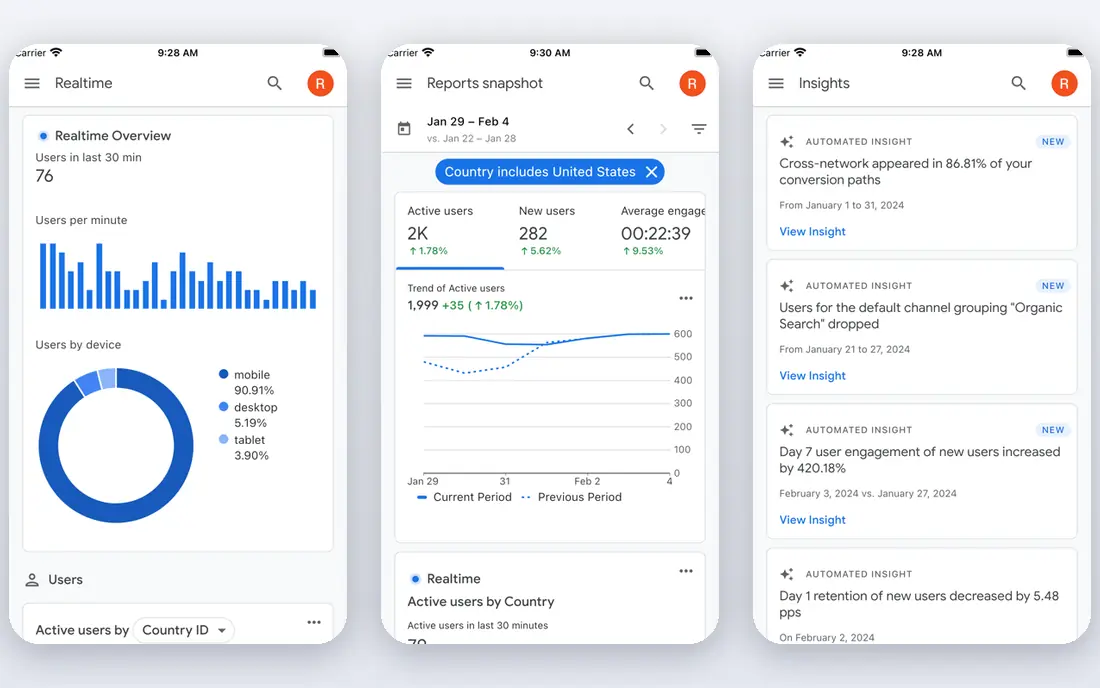
Google Search Console is the first tool every beginner should set up. It shows which search queries bring visitors to your site, which pages rank, where you rank on average, and whether Google has indexing or mobile usability problems. Because the data comes directly from Google, it is more accurate for your own site than any third-party estimate.
It does not show competitor rankings or full keyword research, so you will need another tool for planning new content. Still, start here, verify your site, and check the Performance report weekly. Look for queries where you rank in positions 8 to 20, since those pages are close to page one and often improve with small content updates.
- Direct data from Google
- Shows queries, clicks and indexing issues
- Free for any site you own
- No competitor data
- Limited keyword research
- Reports need interpretation

Mangools is often the easiest paid tool for a beginner to understand. Its suite includes KWFinder for keyword research, SERPChecker for search results, SERPWatcher for rank tracking, LinkMiner for backlinks and SiteProfiler for site overviews. Each tool does one job well, without the dense dashboards of larger platforms.
The limits are audit depth and tracking frequency. Mangools has no full technical site audit, and lower plans update rankings weekly rather than daily. If you need daily tracking or a deep audit, pair Mangools with Google Search Console, or move to SE Ranking or Semrush later.
- Very easy interface
- Five tools in one suite
- Clear keyword difficulty scores
- No full site audit
- Backlink data comes from a partner
- Rank tracking updates weekly on lower plans

Ubersuggest, from Neil Patel, is a good budget option for beginners who want keyword research, rank tracking and a basic site audit without a large monthly bill. Monthly plans start at $29, and a lifetime Individual plan has been offered at $290 in the past, which can save money if you will use it for years. The free account lets you test core features before you pay.
Data depth is the trade-off. Keyword and backlink data are useful for planning, but they are not as deep as Semrush or Ahrefs. For a new blog or small business site, that depth is usually enough. Upgrade when you need competitor backlink analysis or larger keyword lists.
- Low monthly price
- Lifetime purchase option
- Keyword ideas and site audit in one tool
- Data depth is thinner than Semrush or Ahrefs
- Some features feel basic for advanced users
Semrush is the most complete tool on this list, covering keyword research, site audits, rank tracking, backlink analysis, content optimization and PPC research in one platform. Its Pro plan costs $139.95 per month, or $117.33 per month billed annually, with a limited free plan and a 7-day trial. For a growing business that will use SEO daily, that breadth can replace several smaller tools.
For a true beginner, Semrush can feel like too much at once. Start with its keyword and audit tools, use its learning guides, and ignore advanced modules until you need them. If you only need keyword research, Mangools or Ubersuggest will cost far less.
- Broad keyword, audit, rank and content tools
- PPC data
- Large learning library
- High price for beginners
- Interface can overwhelm new users
Ahrefs is best known for backlink and competitor research, and it is the tool many professionals check first when they want to see why a rival ranks well. Its Starter plan costs $29 per month, while the Lite plan costs $129 per month, and Ahrefs Free tools cover your own verified sites. Site Explorer, Keywords Explorer and Site Audit are the core modules for beginners.
The learning curve is steeper than Mangools, and the most useful plans are pricier. Use Ahrefs when competitor and link research become a priority, such as when you are building links or trying to outrank established sites. For basic keyword research alone, a cheaper tool may be enough.
- Deep backlink index
- Clear competitor reports
- Free tools for your own sites
- Full Lite plan costs $129 per month
- Interface assumes some SEO knowledge
Moz Pro suits beginners who want reports they can explain to a client or boss without a glossary. Its Starter plan costs $49 per month, or $39 per month billed annually, and it covers keyword research, rank tracking, site audits and link research. Moz also offers a large free learning library, which helps if you are learning SEO from scratch.
The main limit is backlink depth compared with Ahrefs, and some advanced features need higher plans. If you work with local businesses, Moz Local and its readable reporting can be a plus. For pure link research at scale, Ahrefs remains stronger.
- Easy to read reports
- Domain Authority metric
- Good learning resources
- Backlink index is smaller than Ahrefs
- Higher plans rise in price
SE Ranking is a strong all-in-one option for small teams and freelancers who track many keywords. It offers keyword research, rank tracking, site audits, backlink checks and reporting, with daily tracking on its core plans and a 14-day trial with no card required. That daily tracking is useful when you are testing content changes and want to see movement quickly.
Beginners may find the module list busy at first, so start with rank tracking and the site audit, then add keyword research. Check the current plan price on the vendor site, since SE Ranking pricing has varied between $65 and $129 per month in different comparisons, depending on plan and billing.
- Daily rank tracking
- White-label reports
- Good value for agencies and teams
- Pricing and plan names change often
- Interface has many modules for beginners
Yoast SEO is different from the other tools here because it works inside WordPress, not as a separate research platform. The free plugin checks titles, meta descriptions, readability, internal links and basic schema, and it flags on-page problems as you write. Premium costs $99 per year and adds redirect tools, internal link suggestions and more.
Yoast does not do keyword research, rank tracking or competitor analysis, so pair it with Google Search Console and one research tool such as Mangools or Ubersuggest. For WordPress beginners, that combination covers on-page basics and planning without a large monthly bill.
- Free WordPress plugin
- Clear on-page checks
- Readability and schema help
- WordPress only
- Does not replace keyword or rank tracking tools
How we picked these
We compared official pricing pages, feature lists and beginner guides for keyword research, rank tracking, audits and ease of use. We included free Google tools, budget tools and larger platforms so readers can start free and upgrade in steps. Prices change often, so confirm the current plan on each vendor site before you subscribe.
A simple beginner SEO workflow
Start with Google Search Console and a notebook, not a paid tool. Verify your site, check which queries already bring traffic, and list the pages that rank just below page one. Fix basic issues first: missing titles, thin pages, broken links and slow mobile pages. Those fixes often help more than new keyword research.
Next, pick ten keywords that match real search intent for your business. Use Mangools, Ubersuggest or Semrush to check search volume and difficulty, then write or update one page per keyword with a clear title, headings and a direct answer to the search question. Track those ten keywords weekly in your chosen tool, and note what changes when you update a page.
Finally, review once a month and repeat what works. Look at clicks and average position in Search Console, check your audit for new errors, and add internal links from older pages to new ones. SEO rewards steady work over months, not a single tool purchase. If a tool does not help you decide what to do next, it is not the right tool yet.
FAQ
What is the best SEO tool for beginners?
Start free with Google Search Console, then add Mangools or Ubersuggest for keyword research. Semrush is best if you want an all-in-one platform and can afford $139.95 per month, while Ahrefs is best for backlink research.
What is the best free SEO tool for beginners?
Google Search Console is the best free tool because it shows real search data for your own site. Google Analytics 4, Mangools free account, Ubersuggest free account and Yoast SEO free plugin are also useful free starting points.
Is Semrush good for beginners?
Yes, but it is expensive and dense for a first tool. Semrush offers a limited free plan and a 7-day trial, plus learning guides, so you can test it. Beginners on a budget will usually learn faster with Mangools or Ubersuggest first.
How much do SEO tools cost for beginners?
Free tools cost nothing, Mangools and Ubersuggest start around $29 per month, Moz Pro starts at $49 per month, SE Ranking varies by plan, Ahrefs Starter is $29 per month, and Semrush Pro is $139.95 per month. Start free, then pay only when you have a site and a workflow that needs the tool.
Do I need more than one SEO tool?
Most beginners need two: Google Search Console plus one research tool. Add a second paid tool only when you hit a clear limit, such as needing deeper backlink data from Ahrefs or daily rank tracking from SE Ranking. More tools do not automatically mean better rankings.
How long does SEO take to work?
SEO usually takes weeks to months to show clear movement, depending on competition, site age and content quality. Track a small set of keywords, publish useful content regularly, fix technical errors and review results monthly rather than daily.