Best Free Keyword Tools in 2026: 9 Tools Compared
Compare the best free keyword tools for 2026, from Google Keyword Planner and Ahrefs to AnswerThePublic, with limits, accuracy, and best uses explained.
- Editor's choice
 Google Keyword Planner
Google demand and CPC
Starts atFreeVisit ads.google.comFull review - Great alternative
 Ahrefs Free Keyword Generator
Quick ideas with metrics
Starts atFreeVisit ahrefs.comFull review - Also consider
 AnswerThePublic
Question keywords
Starts atFreeVisit answerthepublic.comFull review
TL;DR:
- Google Keyword Planner is the best free starting point for demand and CPC data, because the data comes from Google itself.
- Ahrefs Free Keyword Generator is the best quick check for ideas, volume, and difficulty across Google, YouTube, and Amazon.
- AnswerThePublic is the best free tool for question keywords and FAQ ideas, despite its daily search limit.
- No free tool gives exact volume and difficulty for every keyword, so combine two or three tools and check Search Console later.
- Free tiers are limited on purpose, so save daily searches for topics you actually plan to write about.
Quick comparison
| Tool | Best for | Starts at | Free plan? | |
|---|---|---|---|---|
| Google Keyword Planner | Google demand and CPC | Free | Yes | Visit |
| Ahrefs Free Keyword Generator | Quick ideas with metrics | Free | Yes | Visit |
| AnswerThePublic | Question keywords | Free | Yes | Visit |
 Ubersuggest | Beginner all in one research | Free | Yes | Visit |
 Keyword Surfer | Volume inside Google results | Free | Yes | Visit |
 WordStream Free Keyword Tool | Quick keyword ideas | Free | Yes | Visit |
 Moz Keyword Explorer | Difficulty and SERP data | See website | Free trial | Visit |
 Keyword Tool | Long tail autocomplete ideas | Free | Yes | Visit |
 Google Trends | Seasonality and rising topics | Free | Yes | Visit |
The best free keyword tools
Free keyword tools differ in what they measure, and that difference matters more than the size of their keyword lists. Some show Google demand, some show questions people ask, and some show what your own site already ranks for. We compared official feature pages, help pages, and pricing pages for the tools below, focusing on free limits, volume accuracy, difficulty data, and practical use for bloggers and small businesses.

Google Keyword Planner remains the best free starting point because its data comes from Google rather than a third party estimate. It gives keyword ideas, average monthly search ranges, competition for advertisers, and CPC estimates, which help you judge both demand and commercial value. You need a Google Ads account to use it, and you may need to complete account setup with billing details, but you do not need to run ads to see basic data.
The main limit is precision. Without active ad spend, volume often appears as a broad range, such as 1K to 10K, rather than an exact figure. That range is fine for comparing keywords against each other, but weak for forecasting traffic. Planner also has no organic difficulty score, since its competition column reflects advertisers, not organic ranking difficulty. Pair it with Ahrefs or Moz for difficulty, and use it as your demand baseline.
- Data comes directly from Google
- CPC and forecast data for ads
- Free with a Google Ads account
- Volume shown as ranges without active ad spend
- No keyword difficulty score for organic ranking
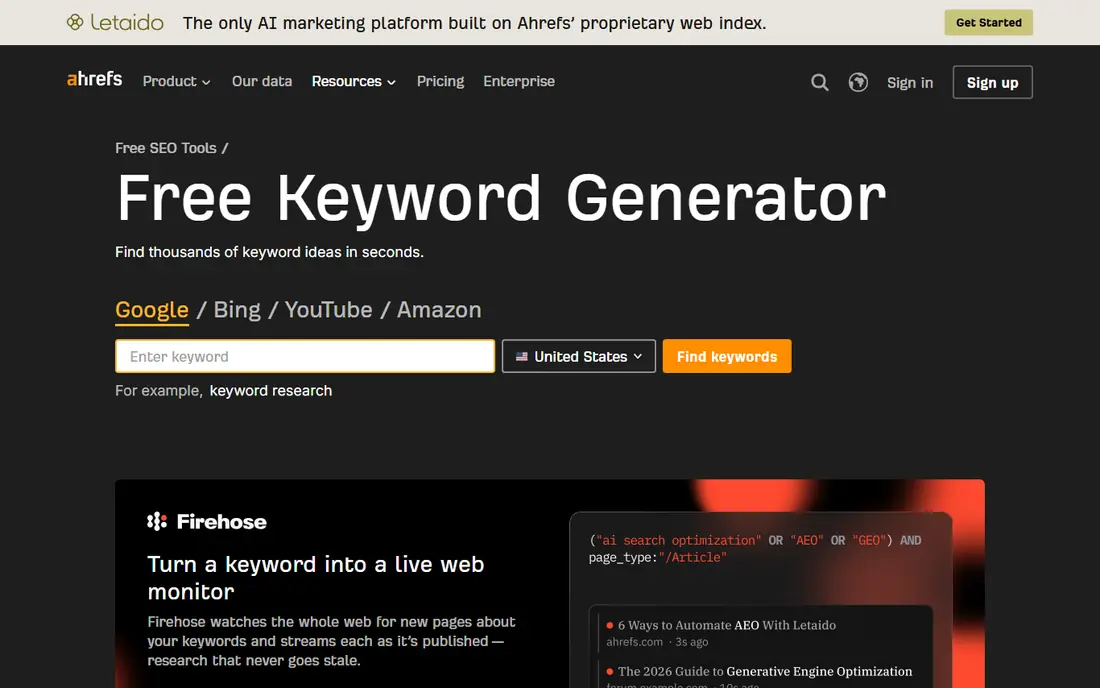
Ahrefs Free Keyword Generator is the best tool on this list for a fast spot check. Type a seed keyword, pick a search engine such as Google, YouTube, or Amazon, and you get ideas with estimated volume and a difficulty score. That combination is useful when you have one topic in mind and want to know quickly whether it is worth a post, a video, or a product page.
The free tool is limited by design, showing a capped set of ideas per search, so it is not a replacement for a full Ahrefs subscription. Paid Ahrefs plans start far higher, so most small sites will use the free generator for spot checks and Planner for broader demand work. For quick decisions, though, few free tools give you ideas, volume, and difficulty in one page as cleanly as this one.
- Fast ideas with volume and difficulty
- Works for Google, YouTube, Bing, and Amazon
- No account needed for basic use
- Limited ideas per search
- Full Ahrefs plans start at a much higher price

AnswerThePublic is the best free tool for finding the questions behind a keyword. It pulls autocomplete style questions and phrases around a seed topic and lays them out in a visual wheel, grouped by question words such as what, why, how, and when. That output is ideal for FAQ sections, blog outlines, and video topics, because it mirrors how real people phrase a problem.
The free tier is tight, commonly three searches per day, so save it for topics you are serious about writing. It also gives no reliable volume or difficulty data, so use it for ideas, not for sizing demand. Pair a question list from AnswerThePublic with volume data from Planner or Ahrefs, and you get both the angle and the evidence for a post.
- Shows real questions people ask
- Visual maps for what, why, and how queries
- Great for FAQ and content angles
- Free tier limited to a few searches per day
- No volume or difficulty data
Ubersuggest is a good all in one pick for beginners who want one tool rather than three. It offers keyword ideas with volume and difficulty, content ideas based on top pages, and basic site audit features, all in a simple interface. That breadth helps a new blogger or small business owner who is still learning what keyword research should include.
The free tier limits daily searches, so heavy research quickly hits a paywall, and its volume and difficulty estimates are less consistent than Ahrefs or Planner data. Treat Ubersuggest as a learning and brainstorming tool, and verify important keywords in Planner or Ahrefs before you build a content plan around them. For casual use, it remains one of the friendliest free options here.
- Keyword ideas, volume, and difficulty in one place
- Content ideas and site audit features
- Easy interface for beginners
- Free searches limited per day
- Volume and difficulty estimates can be inconsistent
Keyword Surfer is a free Chrome extension that shows estimated search volume, related terms, and on page data directly beside Google results as you search. That inline view is useful because you see keyword data in the same place you already judge result quality, without opening a separate tool or exporting a list. It also shows word counts and related terms for pages that rank, which helps you scope a post.
The limit is that it is an extension, not a full research workspace, so you cannot easily build, filter, and save large keyword lists inside it. Estimates also vary by topic and should be treated as directional, not exact. Use Keyword Surfer for quick checks while you browse, and use Planner or Ahrefs when you need a structured list for a content plan.
- Shows volume and ideas inside Google results
- Free Chrome extension
- No separate tool to open
- Extension only, so no standalone research workspace
- Estimates vary by topic
WordStream Free Keyword Tool is a simple, fast way to turn one seed keyword into a list of related ideas with volume and CPC data. It is especially useful for ad brainstorming, because CPC helps you spot commercial intent, but the same data helps content planning too, since high CPC often signals a keyword tied to a purchase decision. The interface has little learning curve, which suits beginners.
Depth is the trade-off. You get a limited set of ideas per search, with less filtering, difficulty, and SERP detail than a paid tool. It works best as a first pass tool: generate ideas here, then check volume ranges in Planner and difficulty in Ahrefs or Moz. For a quick list to start a brainstorm, it does the job well.
- Fast keyword ideas with volume and CPC
- Simple interface
- Useful for ad and content brainstorming
- Limited ideas per search
- Less depth than Planner or Ahrefs
Moz Keyword Explorer is the best pick here if difficulty and SERP context matter most to you. It gives a difficulty score, an organic click through estimate, and a priority score that combines volume, difficulty, and CTR, plus a look at the pages that currently rank. That SERP view helps you judge whether a keyword is realistic for a new site, not just popular.
Free access is limited, often through a trial or a capped free account, so check the current offer on the Moz site before you plan around it. Paid Moz plans are also costly for a small site that only needs occasional research. Use Moz for shortlisting competitive keywords, and use Planner and Ahrefs free tools for everyday volume checks.
- Difficulty score and organic CTR estimates
- SERP analysis for top pages
- Useful priority score for planning
- Free access is limited and trial based
- Paid plans are costly for small sites
Keyword Tool is built around autocomplete data, so it excels at long tail ideas that other tools miss. Type a seed word and it returns hundreds of phrases people actually type, across Google, YouTube, Bing, Amazon, and other platforms. That breadth is useful for niche topics, product pages, and video titles, where the exact phrasing matters as much as the main keyword.
The free version shows suggestions without volume, CPC, or competition data, so you will need Planner or Ahrefs to size the ideas it finds. Free lists can also include many near duplicates, so filter for intent rather than copying the whole list into a plan. As an idea generator, especially for long tail and platform specific keywords, it is one of the strongest free tools here.
- Large lists of long tail autocomplete ideas
- Works across Google, YouTube, Bing, and Amazon
- Good for niche topics
- Volume and CPC need a paid plan
- Free lists can include many low value variations
Google Trends is the best free tool for timing and direction. It shows relative search interest over time, by region, and for related topics and queries, which helps you spot seasonality, rising terms, and declining topics before you invest in content. A keyword that looks steady in Planner may be fading in Trends, or a niche term may be rising fast, and that timing changes what you should write first.
Trends does not give absolute volume, difficulty, or CPC, since its scores are relative to a peak of 100. Use it beside Planner: Planner tells you how big demand is, Trends tells you whether it is growing, seasonal, or regional. For news, seasonal products, and trend driven content, that pairing is more useful than either tool alone.
- Shows interest over time and by region
- Rising and breakout topics
- Completely free with no search cap
- Relative interest, not absolute search volume
- No difficulty or CPC data
How we picked these
We compared official feature pages, help pages, and pricing pages, and favored tools with a genuinely usable free tier, not just a short trial disguised as free. We included demand tools, question tools, long tail tools, inline tools, and trend tools, so the list covers different research jobs rather than repeating one type. We did not claim hands on testing, and free limits reflect vendor pages and recent guides checked in October 2026, so confirm current limits before you plan a large project.
A free keyword workflow that works
Start with Planner for demand and CPC, then use AnswerThePublic or Keyword Tool for angles and long tail phrases. Check difficulty in Ahrefs Free Keyword Generator or Moz, and check timing in Google Trends. That four step loop takes under an hour for one topic and gives you demand, ideas, difficulty, and timing without paying for a suite.
Keep a simple sheet with the keyword, intent, volume range, difficulty, and the page you plan to create. Free tools give estimates, not guarantees, so revisit the sheet after a post is live and check Search Console for the real queries it ranks for. Those real queries are often the best next keywords, because they show demand you already partly serve.
What free tools cannot tell you
Free tools cannot reliably predict rankings, traffic, or revenue. Volume is an estimate, difficulty is a model, and CPC reflects advertisers, not readers. Treat every number as a range and a comparison, not a promise, and judge a keyword by the page you can actually create for it. A keyword with lower volume and a clear, helpful page often beats a high volume keyword with a thin page.
FAQ
What is the best free keyword tool overall?
Google Keyword Planner is the best free starting point for demand and CPC, because its data comes from Google. Pair it with Ahrefs Free Keyword Generator for difficulty and AnswerThePublic for question ideas. No single free tool covers demand, difficulty, and questions well on its own.
Is Google Keyword Planner really free?
Yes, it is free with a Google Ads account, though you may need to complete account setup with billing details to use it. You do not need to run ads to see basic keyword ideas. Without active ad spend, volume appears as broad ranges rather than exact figures.
How many free searches does AnswerThePublic allow?
The free tier commonly allows about three searches per day, refreshed daily. Save those searches for topics you plan to write about, and use Keyword Tool or Ubersuggest for broader brainstorming on other days.
Can I do keyword research without paying for Ahrefs or Semrush?
Yes, for most small sites. Planner, Ahrefs Free Keyword Generator, AnswerThePublic, Keyword Surfer, and Google Trends together cover demand, difficulty, questions, and timing. Paid suites help mainly when you need large lists, competitor data, and rank tracking at scale.
Why do free tools show different search volumes?
Each tool uses a different model, data source, and time period, so estimates vary. Planner uses Google data with ranges, while third party tools model volume from clickstream and other sources. Compare keywords within one tool for consistency, and use a second tool to sanity check important decisions.