Best Content Marketing Automation Tools in 2026: 10 Tools Compared
best content marketing automation tools for 2026: 10 tools compared by price, calendars, publishing, SEO, email automation and reporting for small teams.

- Editor's choice
 HubSpot Marketing Hub
Full marketing automation
Starts atFreeVisit hubspot.comFull review - Great alternative
 CoSchedule
Editorial calendars
Starts atFreeVisit coschedule.comFull review - Also consider
 StoryChief
Multichannel publishing
Starts atFreeVisit storychief.ioFull review
TL;DR:
- HubSpot Marketing Hub is the fullest automation platform here, but its price and hub structure make it best for teams that already use HubSpot CRM.
- CoSchedule from $29 per month billed annually and StoryChief from $12 per month are the best value starting points for editorial calendars and multichannel publishing.
- Buffer and similar social schedulers automate distribution well, but they do not replace a content strategy, brief or SEO research tool.
- Surfer SEO at $49 per month, Frase at $39 per month billed annually and Clearscope at $129 per month cover SEO optimisation at budget, mid and premium levels.
- The best automation setup is usually a calendar tool plus a publishing tool plus one SEO tool, rather than one expensive platform that does everything poorly.
Quick comparison
| Tool | Best for | Starts at | Free plan? | |
|---|---|---|---|---|
| HubSpot Marketing Hub | Full marketing automation | Free | Yes | Visit |
| CoSchedule | Editorial calendars | Free | Yes | Visit |
| StoryChief | Multichannel publishing | Free | Yes | Visit |
 Buffer | Social scheduling | Free | Yes | Visit |
 Mailchimp | Email automation for content | Free | Yes | Visit |
 ActiveCampaign | Email and CRM automation | See website | Free trial | Visit |
 Semrush | SEO and content toolkit | See website | Free trial | Visit |
 Surfer SEO | SEO content optimisation | $49 per month | No | Visit |
 Frase | Budget SEO research | $39 per month | No | Visit |
 Clearscope | Premium SEO grading | $129 per month | No | Visit |
The best content marketing automation tools
Content marketing automation covers planning, creation, publishing, distribution and measurement, and no single tool does all five equally well. The tools below are grouped by the job they automate best, so you can build a stack that fits your team size and budget rather than buying one platform for features you will not use.

HubSpot Marketing Hub is the closest thing here to a complete content marketing system. Free tools cover forms, email and basic CRM, while paid tiers add workflows, lead scoring, A/B testing, landing pages and campaign reporting. Because contacts, content and deals share one CRM, you can trace a blog post to a lead and then to revenue without stitching reports together.
That completeness has a cost. Paid Marketing Hub tiers are priced by contacts and features, and adding Sales Hub or Service Hub increases the total further. Small teams may also spend weeks setting up workflows, lists and templates before automation saves time. HubSpot is best for a team that already uses HubSpot CRM or plans to centralise marketing, sales and service in one vendor.
- CRM, email, landing pages and reporting in one place
- Strong automation workflows
- Large integration set
- Paid tiers climb quickly
- Hubs are priced separately
- Setup takes time for small teams

CoSchedule is built around one idea: plan everything on a calendar, then publish from that calendar. The free plan covers one user, one social profile and up to 15 scheduled posts at a time, while Starter at $29 per month billed annually adds three profiles and Professional at $49 adds two users and five profiles. Social campaigns move with a launch date, so rescheduling a blog post reschedules its promotion automatically.
Watch the add-on costs. Posting to X costs $16 per profile per month on Starter and Professional in current pricing summaries, and extra profiles cost $5 per month each, so a team with many X accounts should price that in. CoSchedule does not try to be a CRM or a general workspace, and that focus is its strength for editorial teams that already have those tools elsewhere.
- Drag-and-drop calendar
- Social campaigns tied to launch dates
- ReQueue for evergreen posts
- X posting is a paid add-on
- Free plan caps profiles and scheduled posts
- Not a full CRM
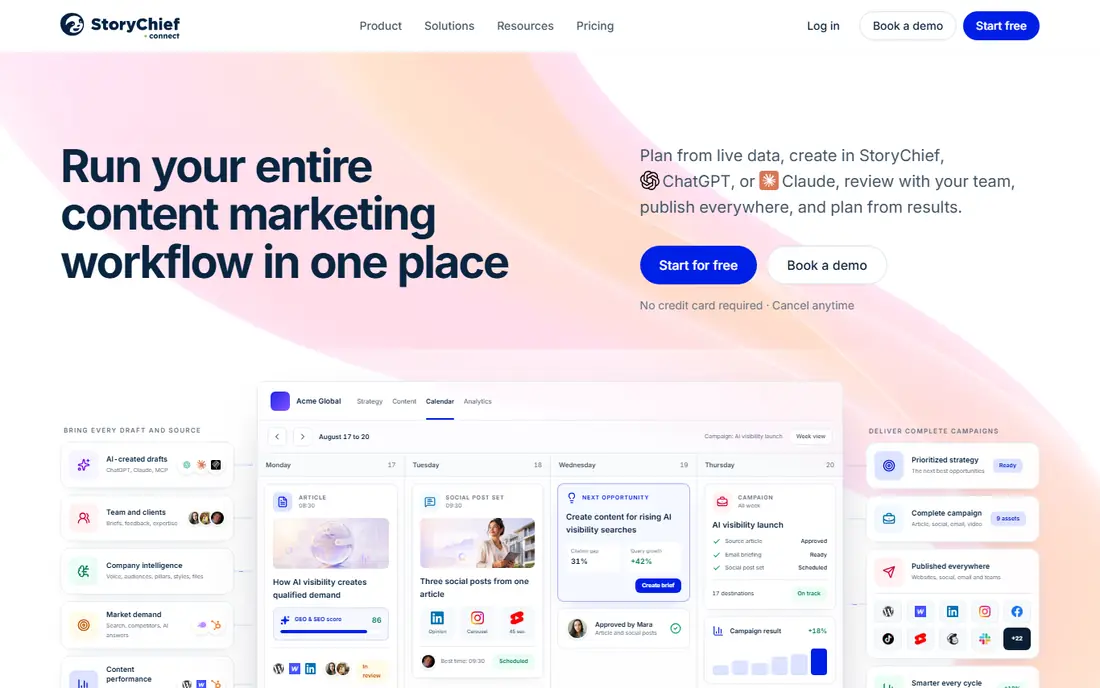
StoryChief lets a small team write once and publish to a blog, social channels and newsletter from one editor, with approvals for stakeholders and guest writer access. The free plan covers the core editor and multichannel publishing, while Essential at about $12 to $16 per month in recent summaries adds unlimited stories, performance measurement and UTM tracking. Pro adds a smart calendar, version history and scheduled posts.
Analytics are lighter than HubSpot, and the integration set is smaller, so teams that need deep revenue attribution will need another reporting tool. For a content team whose main pain is copying the same article into five places, StoryChief removes that manual work at a low price. It is a practical choice for agencies and small editorial teams with many channels.
- One editor for blog, social and newsletter
- Approvals and guest writers
- UTM tracking on paid plans
- Essential pricing varies by source
- Smaller integration set
- Analytics are lighter than HubSpot
Buffer automates the distribution half of content marketing: schedule posts, maintain a queue, publish to major social channels and review basic analytics. Its simplicity is the appeal, because a solo marketer can set up a week of posts in one sitting without learning a complex platform. Paid plans add more channels, users and analytics, but the core workflow stays the same.
Buffer does not plan content strategy, write briefs or grade SEO, so it pairs best with a calendar tool like CoSchedule or an SEO tool like Surfer. Free plan limits on channels and scheduled posts also mean active teams will need a paid plan quickly. Use Buffer when social distribution is the bottleneck, not when you need help deciding what to write.
- Simple scheduling and queue
- Channel analytics
- Low learning curve
- Free plan is limited
- No content strategy or SEO research
- Engagement tools need higher tiers
Mailchimp automates the email side of content marketing: send a new post to subscribers, trigger a welcome series, segment by interest and test subject lines. Its free plan covers basic email and landing pages for small lists, while paid plans add journeys, predictive segmentation and advanced analytics. For a creator or small business whose main channel is email, that automation is often more valuable than a social scheduler.
Pricing is contact-based, so a growing list raises the monthly cost even if sending volume stays flat. Advanced automation also sits on higher tiers, so check which journey features your plan includes before you build a complex series. Mailchimp is best for teams that distribute content mainly by email and newsletter.
- Email journeys and segmentation
- Landing pages
- Content templates and analytics
- Pricing rises with contacts
- Automation depth varies by tier
- Support varies by plan
ActiveCampaign combines email automation with a built-in CRM, which suits teams that want content, lead nurturing and sales follow-up in one workflow. Its automation builder handles triggers, conditions, goals and split paths in more detail than Mailchimp free tiers, and site tracking can trigger content offers based on pages visited. That depth helps a team that runs webinars, courses or long sales cycles.
The trade-off is complexity and price. Plans are tiered by contacts and features, and pricing should be confirmed on the vendor site for your list size. New users may need time to learn the builder and avoid overcomplicated automations that are hard to debug. ActiveCampaign is best for a team that already thinks in journeys and wants CRM and email in one place.
- Strong automation builder
- CRM included
- Segmentation and site tracking
- Pricing is quote and tier based
- Learning curve for automation
- Contact-based pricing
Semrush is a broad SEO and marketing toolkit whose content marketing features include topic research, SEO content templates, writing assistance and post tracking. A team can move from keyword research to a brief to a published post without leaving the suite, and site audits flag technical issues that hurt rankings. That breadth is useful for a team that also handles paid search and social analytics.
Price and density are the cautions. Semrush is priced as a professional suite, not as a single-purpose content tool, and new users can feel lost among its many reports. Small teams that only need content optimisation may get better value from Surfer or Frase. Semrush suits a team that will use keyword research, audits and content tools together each week.
- Keyword research, topic research and content templates
- Site audit
- Social and PPC tools
- Price is high for small teams
- Interface is dense
- Content tools are part of a larger suite
Surfer SEO helps writers optimise a draft against pages that already rank for a keyword. Its content editor scores structure, terms, headings and length in real time, while SERP analysis shows what top pages cover and how long they are. At $49 per month for Discovery in recent comparisons, it is the all-rounder pick for teams that publish SEO content regularly.
Surfer does not write the article for you, and a high score does not guarantee a useful article, so editorial judgment still matters. Some features use credits, which can limit heavy users on lower tiers. For a team that already has writers and needs a consistent optimisation standard, Surfer gives a clear, repeatable checklist for each post.
- Content editor with real-time scoring
- SERP analysis
- Audit and internal linking tools
- No free plan
- Writing quality still depends on the writer
- Credits limit some features
Frase is the budget research pick for teams that want fast briefs without paying premium SEO prices. It analyses top-ranking pages, extracts common questions and headings, and builds a brief a writer can follow. At $39 per month billed annually in recent comparisons, it undercuts Surfer and Clearscope while covering the research step well.
AI drafting in Frase is a starting point, not a finished article, and heavy use may need higher tiers or add-ons. Frase also does not replace a publishing calendar or social scheduler, so pair it with CoSchedule or Buffer. For a small team that publishes several SEO posts a month, Frase offers the best research value in this list.
- Research briefs from top results
- AI outline and writing help
- Lower price than Clearscope
- No free plan
- AI output needs editing
- Interface is research focused, not a full calendar
Clearscope is the premium option for editorial teams that want a simple, writer-friendly grade. Its editor highlights relevant terms, shows how well a draft covers a topic, and gives a letter grade that editors can use in review without learning SEO jargon. That clarity helps larger teams maintain a consistent standard across many writers.
At $129 per month, Clearscope is expensive if you only publish a few posts a month, and it does not include keyword research, calendar or publishing tools. It is best for a team that publishes at volume, has dedicated writers and editors, and wants grading to be the quality gate before publication. Smaller teams should start with Frase or Surfer.
- Editor-friendly content grading
- Clear term recommendations
- Strong for editorial teams
- Highest price here for a single-purpose tool
- No free plan
- Limited features beyond grading
How we picked these
We compared vendor pricing pages, feature documentation and public comparison summaries checked in October 2026. We looked for automation that actually saves time: calendar planning, multichannel publishing, email journeys, SEO research and reporting, rather than a long feature list that is rarely used. Prices are starting prices and vary by contacts, users or credits, so confirm the total for your team size on each vendor site.
Build a stack, not a single purchase
Start with the bottleneck. If planning is chaotic, buy a calendar tool first. If publishing to many channels takes hours, buy a multichannel tool. If posts do not rank, buy an SEO tool. Adding HubSpot or ActiveCampaign before you have a steady publishing rhythm often creates setup work without content to automate.
Measure what automation should improve
Track time to publish, posts per month, email open and click rates, and organic traffic for target keywords. If automation does not improve at least one of those within two months, simplify the stack rather than adding another tool. Automation should reduce manual copying, missed posts and inconsistent formatting, not create new dashboards to check.
FAQ
What is the best content marketing automation tool for a small team?
For a small team, CoSchedule for calendars plus StoryChief or Buffer for publishing is a strong low-cost stack. Add Frase for SEO research if you publish search content. HubSpot is better once you need CRM, email journeys and revenue reporting in one place and can afford its paid tiers.
Is HubSpot worth it for content marketing?
HubSpot is worth it if you use its CRM, email, landing pages and reporting together and have the budget for paid tiers. If you only need a calendar and social scheduling, CoSchedule and Buffer cost far less. HubSpot pricing rises with contacts and hubs, so model the full bundle before signing.
Can content marketing be fully automated?
No. Automation can schedule, publish, distribute and report, but strategy, research, writing and editing still need people. AI tools can draft outlines and first versions, but a human editor should check facts, tone and accuracy before publication. The best automation removes repetitive tasks so writers can focus on useful content.
How much do content marketing automation tools cost?
Entry costs run from free for Buffer, CoSchedule, StoryChief, Mailchimp and HubSpot free tiers to $29 per month for CoSchedule Starter, $39 for Frase and $49 for Surfer. Premium tools like Clearscope at $129 per month and HubSpot paid tiers cost more. Contact-based pricing for email tools can raise costs as your list grows.
What is the difference between CoSchedule and StoryChief?
CoSchedule is strongest for editorial calendars and social campaigns tied to launch dates, while StoryChief is strongest for writing once and publishing to blog, social and newsletter channels from one editor. Many teams use CoSchedule to plan and StoryChief or Buffer to publish, depending on which workflow is more painful.
Do I need an SEO tool for content marketing?
You need an SEO tool if organic search is a main channel for your content. Frase, Surfer and Clearscope help research, brief and grade posts so they cover what searchers expect. If your main channels are email and social, a calendar and publishing tool may matter more than an SEO grader.
Sources
- https://www.hubspot.com/pricing/marketing/
- https://www.coschedule.com/pricing/
- https://www.storychief.io/pricing/
- https://www.buffer.com/pricing/
- https://www.mailchimp.com/pricing/
- https://www.activecampaign.com/pricing/
- https://www.semrush.com/pricing/
- https://www.surfer.com/pricing/
- https://www.frase.io/pricing/
- https://www.clearscope.io/pricing/